> For the complete documentation index, see [llms.txt](https://docs.3q.video/llms.txt). Markdown versions of documentation pages are available by appending `.md` to page URLs; this page is available as [Markdown](https://docs.3q.video/user-guide-new-ui/projects.md).
# Projects
### Project Management (Content Pools)
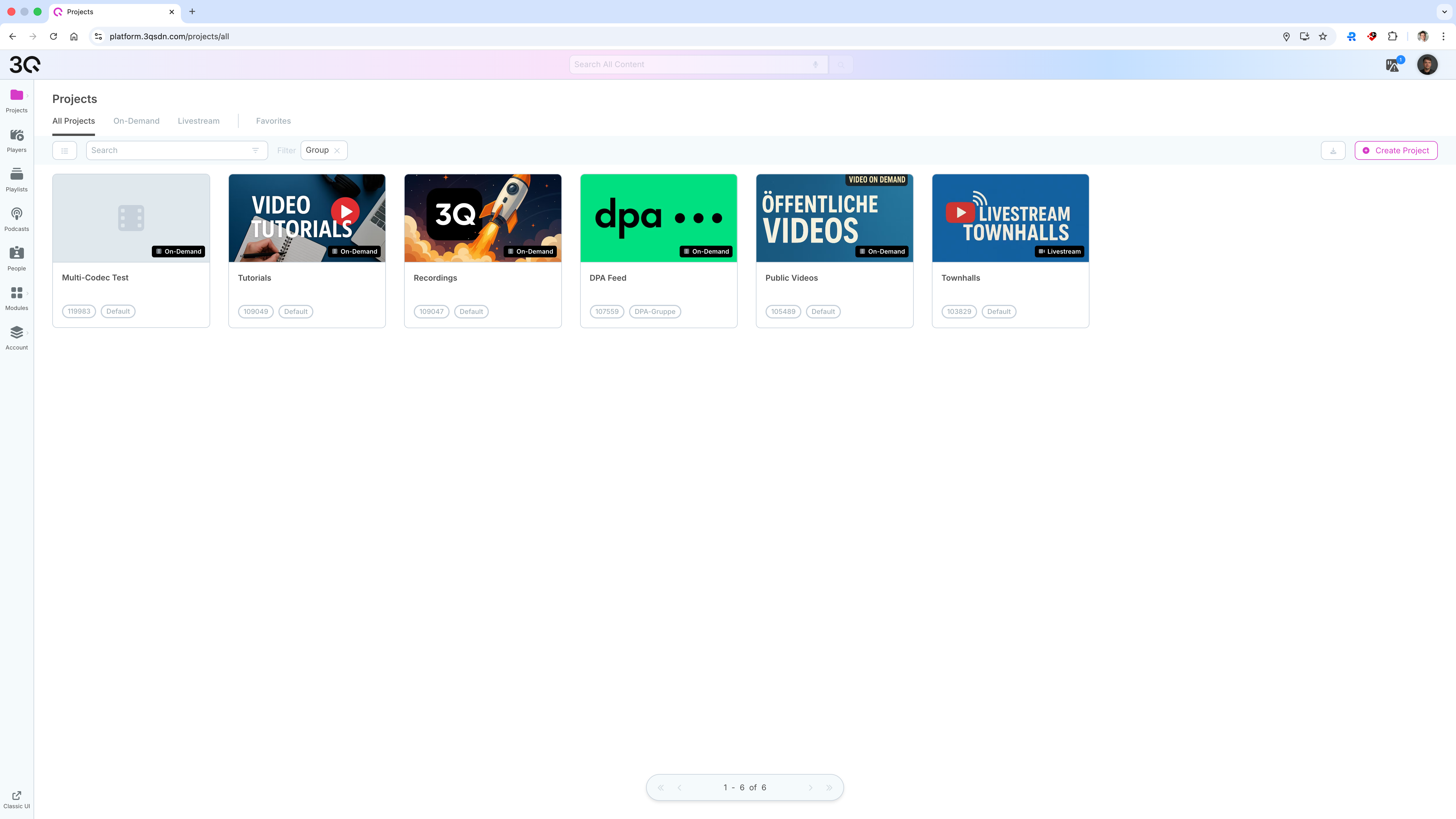
Projects - also referred to as **Content Pools** - are the central organizational units for media content on the platform. In **On-Demand projects**, you can upload and manage an unlimited number of media files, while **Livestream projects** represent a dedicated livestream channel used to create and manage live broadcasts.
***
### Projects Overview
The **Projects** section provides an overview of all available content pools within the account.
Here you can:
* View all existing projects
* Filter projects by type (**On-Demand** or **Livestream**)
* Mark projects as favorites
* Search for projects by name
* Create new projects
Projects are displayed as tiles showing the project name, type, and assigned group.
***
### Project Types
Two project types are available:
#### On-Demand Projects
On-Demand projects are used to manage pre-recorded media content.
Within an On-Demand project, you can:
* Upload video and audio files
* [Organize and manage media assets](/user-guide-new-ui/projects/on-demand.md)
* Publish content for on-demand playback
#### Livestream Projects
Livestream projects are used for live video events.
Within a Livestream project, you can:
* Stream video and audio content
* [Configure and manage live streams](/user-guide-new-ui/projects/livestreaming.md)
* Store and manage livestream recordings (depending on enabled modules)
***
### Creating a Project
### Required Permissions for Creating Projects
{% hint style="info" %}
To create projects, one of the following conditions must apply:
* You created the customer account and therefore automatically have all user permissions.
* You were invited to the account as a user and have been granted the permission.
* You have the **Admin** role for the customer account.
{% endhint %}
New projects can be created directly from the Projects overview.
When creating a project, you define:
* **Title** of the project
* **Project type** (On-Demand or Livestream)
* [**Group assignment**](/user-guide-new-ui/account/groups.md)
* **Default publication status**
* **Default metadata language**
These settings apply to all content within the project.
***
### Project Configuration
Additional configuration options depend on the selected project type and enabled modules.
Detailed configuration settings for:
* [**On-Demand projects**](/user-guide-new-ui/projects/livestreaming.md)
* [**Livestream projects**](/user-guide-new-ui/projects/on-demand.md)
are described in the corresponding chapters of this documentation.
***
### Accessing Project Options
Each project provides a context menu with additional project actions.
Depending on the selected view, you can access these options in different ways:
* In the **tile view**, move the mouse over the project card. The available project action icons appear directly on the card. Click the **three-dot menu** to open further options.
* In the **list view**, move the mouse over the project row. The available actions appear on the right side of the row. Click the **three-dot badge** to open the project options menu.
Depending on the project type and your permissions, the menu may include options such as:
* **Tag Management**
* **Input Signal Settings** for livestream projects
* **Transcoding Settings** for livestream projects
* **Encoding Settings** for on demand projects
* **Playout and Sharing**
* **Create Copy**
* **Delete**
***
### Deleting a Project
Projects can be deleted from the project options menu.
To delete a project:
1. Open the **Projects** overview.
2. Move the mouse over the project you want to delete.
3. Open the project options menu using the **three-dot menu**.
4. Select **Delete**.
5. Confirm the deletion when prompted.
{% hint style="info" %}
Deleting a project removes the project from the account. Before deleting a project, make sure that the project and its content are no longer required. Depending on your account configuration and permissions, deletion may also affect media files, livestream settings, playouts, and integrations connected to this project.
{% endhint %}